Mitigating a High-Risk Phishing Attack Using Microsoft Defender Threat Explorer
A targeted business email compromise (BEC) campaign bypassed initial perimeter hygiene using lookalike infrastructure. Here is how Threat Explorer was leveraged to scope, hunt, and execute tenant-wide remediation in minutes.
Targets
42 Mailboxes
C-Suite & Finance teams
Dwell Time
14 Minutes
Detection to tenant hard delete
Purge Rate
100%
Zero clicks on malicious link
Financial Impact
$0
Prevented credential theft
Executive Summary
- Organization: Mid-sized Financial Services Provider handling sensitive transactions and corporate payments.
- The Challenge: Targeted spear-phishing from a newly registered lookalike domain mimicking the internal "IT Helpdesk".
- The Solution: Centralized hunting, scoped query filtering, and bulk remediation using Defender Threat Explorer.
- The Result: 100% tenant-wide hard purge completed within 14 minutes with zero credential loss or lateral movement.
Incident Response Architecture
Step-by-step mitigation workflow via Microsoft Defender Threat Explorer.
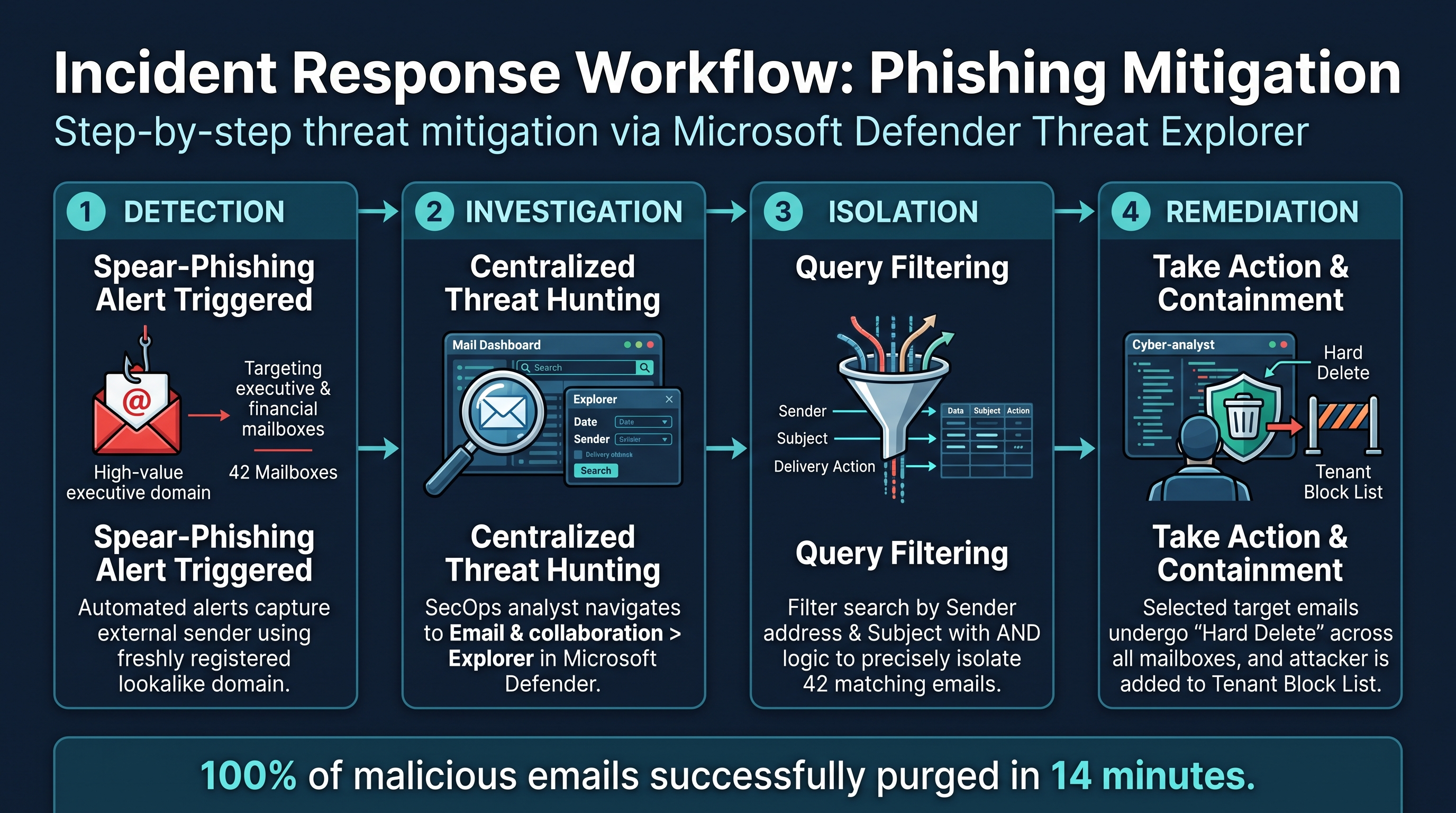
Figure 1.0: End-to-end telemetry flow (Detection → Investigation → Isolation → Remediation).
Incident Breakdown & Technical Execution
1. Spear-Phishing Detection
An automated high-severity alert triggered in the SOC when an external sender bypassed initial edge hygiene using a lookalike domain. Masquerading as an urgent "IT Helpdesk" patch request, the attack targeted 42 high-value mailboxes across executive and finance teams.
2. Threat Investigation via Threat Explorer
The hunting query was scoped across the tenant by setting:
- View:
All emailto capture delivery across all mail folders. - Date Range: Constrained around the active attack window to eliminate query overhead.
- Filter Logic:
Sender address→Equal any of(with pivoting toSubject). - Compound Filter (AND): Layered
Delivery action = Deliveredto prioritize items that reached inboxes.
3. Tenant Hard Deletion & Containment
Once the 42 instances were verified in the grid:
- The master selector was checked to target all 42 instances simultaneously.
- The analyst selected Take action > Hard Delete, permanently removing the messages from user views and Recoverable Items.
- Extracted attacker infrastructure was added to the Tenant Allow/Block List to immediately drop subsequent delivery attempts.
Traditional Playbook vs. Threat Explorer
| Stage | Manual / Legacy Playbook | Defender Explorer Approach |
|---|---|---|
| Discovery | Relying on end-user tickets or running slow PowerShell compliance searches. | Near real-time alert aggregation and central dashboard telemetry. |
| Analysis | Parsing raw headers manually; exposure risk with live malicious links. | Safe in-browser parsing by Sender, Subject, Sender IP, and Message ID. |
| Remediation | Purging mailboxes individually via scripted loops; hours of exposure. | Tenant-wide Hard Delete completed in seconds directly from UI. |